

AutoCAD has a Dark Color theme and a Light theme. In all, there are four basic configurations. Dark and Light, regular and large buttons. These are accessed via the OPTIONS command (type in or right-click on the Command: line). They are found on the Display tab.
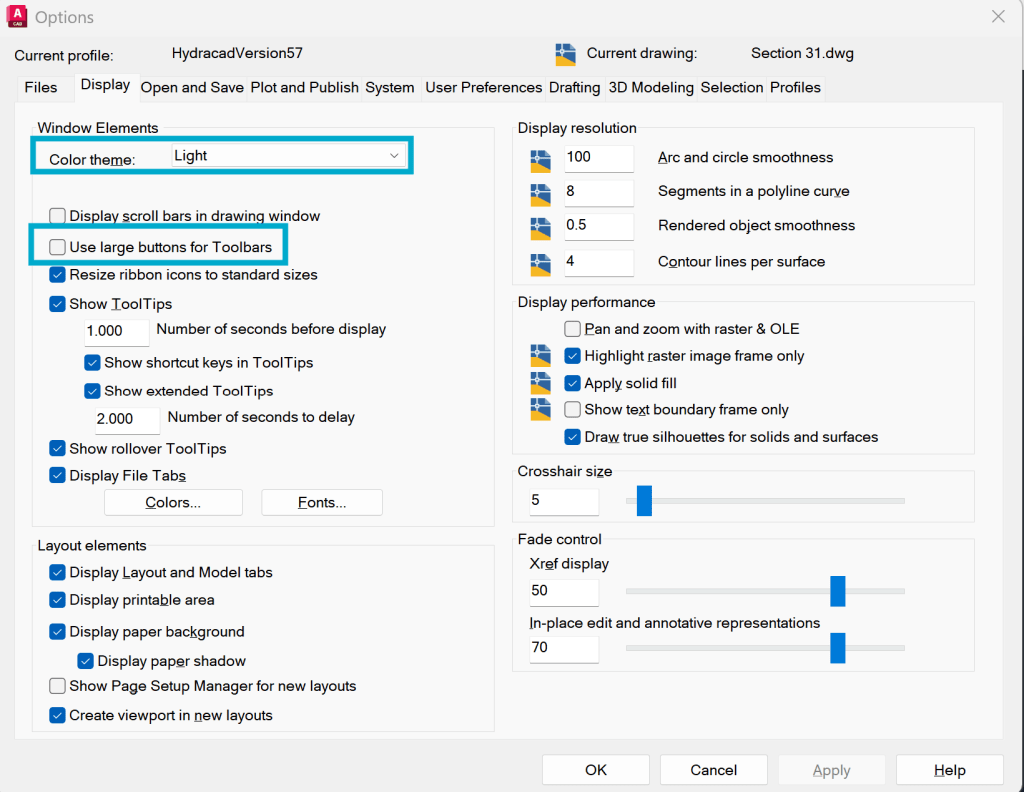
The default is the dark theme with regular-sized buttons, which some find hard to read, so they choose the large buttons. Or they choose Light with either large buttons or not. These four look like:
Light Theme / Large Buttons

Light Theme / Regular Buttons

Dark Theme / Large Buttons

Dark Theme / Regular Buttons

For a large monitor, the large buttons work best. For a laptop, I’ve found the regular size to be best, as the large are too large to all fit. Personally, I recommend large dark over regular dark, as I find the regular dark to be almost unreadable. If you are going to go ‘regular’, I recommend the Light theme.
Also notice the Ribbon buttons do not get larger by selecting Large.


Leave a Reply