

Many companies keep their HydraLIST database pricing current, at least to the best of their abilities given how often prices change. If you enter a part number into HydraLIST, the pricing gets pulled up when the list is processed. If you use certain parts regularly, it makes sense to update the HydraLIST Database with those prices. This can be done one-by-one or with one of the Wizard in HydraLIST.
But what if you just need to add some items that you only use once in a while, and don’t feel like adding to the database. Can those be priced? Yes, they can.
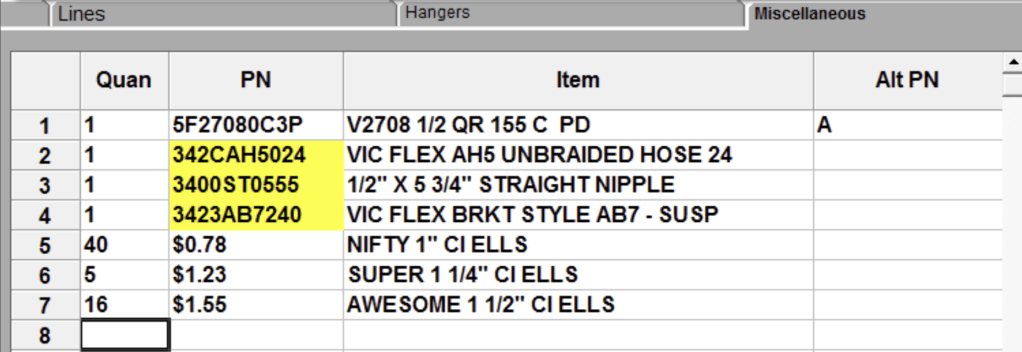
On the Miscellaneous tab enter in the Quantity and Item descriptions. Instead of typing in the (non-existent) part number, type in the price instead, as seen below:
When the list is processed (assuming at least one of the pricing reports is turned on), these items will be priced under the Special Order Items, with the prices extended.
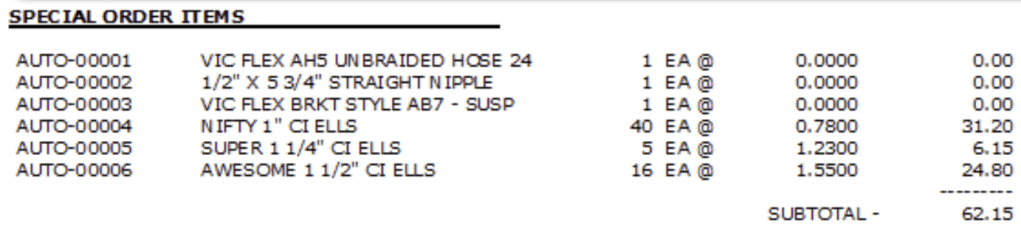
Note, however, that the items are not grouped with like items, but are instead tossed into the Special Order Items category. If you want them to show up with their buddies, then define them in the database.


Leave a Reply