The H-Factor

Reducing Entropy

Recent Posts

Welcome

Recently our previous blog service (Typepad) ended their business – so, we have a new home. It will take a bit to get images back and displaying properly, but we are working on it! Final pageview count of original Typepad blog: 387,232

Using a Non-Standard Pipe Type in HydraCALC

A customer called today asking how to enter a 1″ black plastic underground pipe for the calc. This particular situation sounded unique enough that I did not tell him to add that pipe type to our database, as I would have if he expected to see this pipe type used repeatedly. I told him to…

Using the Hydratec Software Download Area

Hydratec uses ShareFile to distribute our software installs and updates. New customers, or those without access, must request access to be able to get at these downloads. Access is only available to customers with a Hydratec subscription or those on an update plan. You can access the download area and request access by picking the…

February 2015
M T W T F S S
 1
2345678
9101112131415
16171819202122
232425262728  

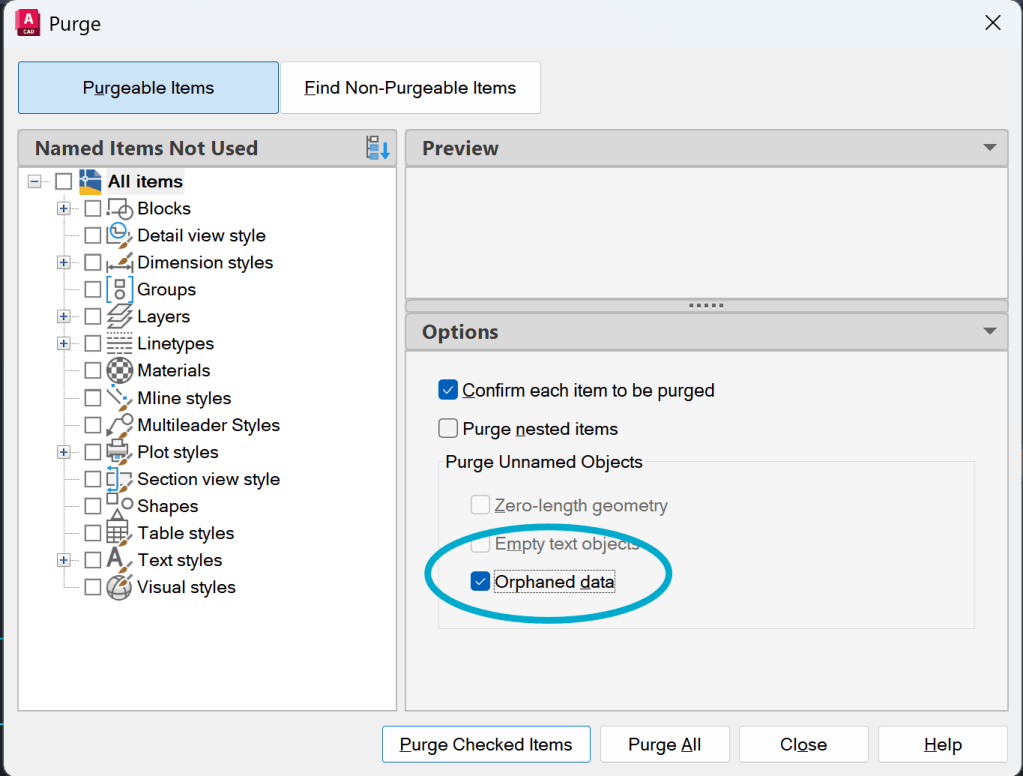
A customer contacted us about a problem with his drawing as the drawing only had about a hundred heads but was 32+ megs. It turns out that the drawing had a large number of DGN Linetypes, and these really bulked up the DWG file. Before we got to dig too deep into the problem, the customer contacted us again and told us that he discovered that AutoCAD has an option built into the PURGE command to eliminate these. The option is the 'Automatically purge orphaned data' option in the PURGE dialog.

This reduced this particular drawing to less than one meg and prevents further problems with 'junk' data from DGN files from coming back as background details get copy and pasted into the drawing.

AutoCAD 2013 and 2014 do not have this command, but Autodesk has created a fix that removes these:

AutoCAD® DGN Hotfix

Posted in

Leave a comment