The H-Factor

Reducing Entropy

Recent Posts

Adding Hanger Types to HydraLIST

If you want to use a new type of hanger, or are a fab shop that gets a job from a contractor that uses a hanger type that you do not have, it is easy to add that new hanger type to your own machine. A hanger is an assembly, and an assembly is just…

Welcome

Recently our previous blog service (Typepad) ended their business – so, we have a new home. It will take a bit to get images back and displaying properly, but we are working on it! Final pageview count of original Typepad blog: 387,232

Using a Non-Standard Pipe Type in HydraCALC

A customer called today asking how to enter a 1″ black plastic underground pipe for the calc. This particular situation sounded unique enough that I did not tell him to add that pipe type to our database, as I would have if he expected to see this pipe type used repeatedly. I told him to…

February 2024
M T W T F S S
 1234
567891011
12131415161718
19202122232425
26272829  

HydraLIST has the capability to store an Alternate Part Numbers for each HydraLIST part, along with our standard part number. Why is this important? Because many fab shops, either independent or sprinkler company based, already have their own part numbering scheme. This ability allows our customers to continue to use their own part numbers when referencing our parts, assemblies, pipe types, hangers, etc. So, they don’t need to start from scratch and build everything over again.

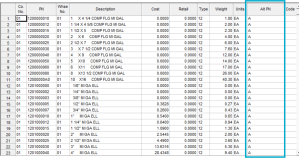
In the HydraLIST database (accessed via the blue boxed button), the input screens have a column for such Alternate Part Numbers:

The second column shows our PN while the blue boxed column shows the Alt PN. Just enter in each alternate part number and save the data and you are done.
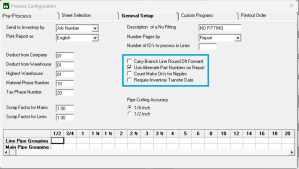
When it is time to print out a stock list, there is an option to print the Alternate Part Number on the General Setup tab:
Please check out the HydraLIST manual for complete details!

Posted in

Leave a comment