The H-Factor

Reducing Entropy

Recent Posts

Adding Hanger Types to HydraLIST

If you want to use a new type of hanger, or are a fab shop that gets a job from a contractor that uses a hanger type that you do not have, it is easy to add that new hanger type to your own machine. A hanger is an assembly, and an assembly is just…

Welcome

Recently our previous blog service (Typepad) ended their business – so, we have a new home. It will take a bit to get images back and displaying properly, but we are working on it! Final pageview count of original Typepad blog: 387,232

Using a Non-Standard Pipe Type in HydraCALC

A customer called today asking how to enter a 1″ black plastic underground pipe for the calc. This particular situation sounded unique enough that I did not tell him to add that pipe type to our database, as I would have if he expected to see this pipe type used repeatedly. I told him to…

September 2013
M T W T F S S
 1
2345678
9101112131415
16171819202122
23242526272829
30  

If you have a large drawing, we have long recommended that you use System Boundaries to break up the drawing for processing. But what if the system to be calculated stretches across other systems? You can still use boundaries, just use more of them, and make them isolate the main (more or less). See below:
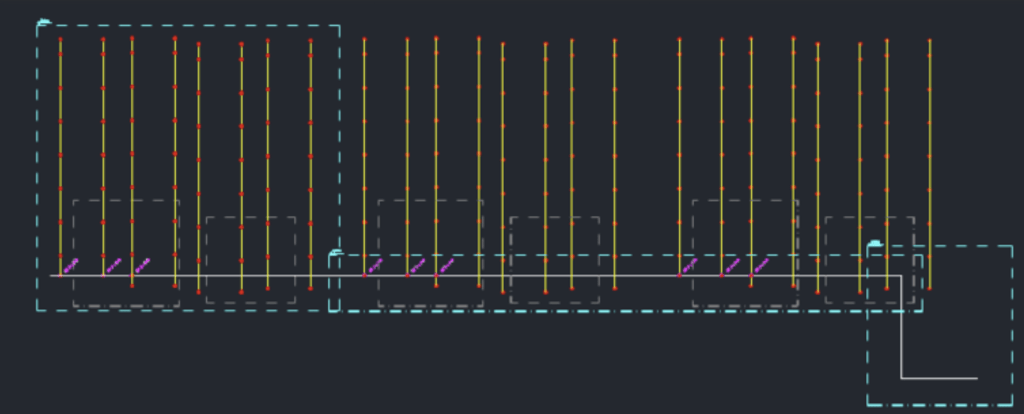
In this building, I drew three boundaries, one around the system at left, and two around the main and underground. They can overlap, and they can contain extra pipes that do not feed the deisred system. When you calculate, or list or go to 3D, just select all three and it will work just fine. Do not worry if there are some extra pipes inside those windows, they wil get filtered out by the software.

PS – One little known thing about boundaries is that the name given to them means nothing to the program. When it comes time to select boundaries, the programs refer to them not by name, but by the fact that they were selected.

Posted in

Leave a comment